
First, we must set a generic volume license key on the server. Every server edition has a unique generic key. Start the command „systeminfo“ in a command prompt to see what Server Edition you need:
systeminfo | find"OS"
You find the commands to install the correct keys in the following list.
Install Product Keys
This step is not needed if you have converted the server from eval to standard/datacenter edition because you installed the key at the process of converting.
Please enter the following command depend of your server edition and version in an administrative command prompt.
cscript.exe c:\windows\system32\slmgr.vbs /ipkCB7KF-BWN84-R7R2Y-793K2-8XDDG
Start activation via KMS server
Now activate the windows server edition.
cscript.exe c:\windows\system32\slmgr.vbs /ato
Show KMS activation information
The next command shows you the state of activation.
cscript.exe c:\windows\system32\slmgr.vbs /dli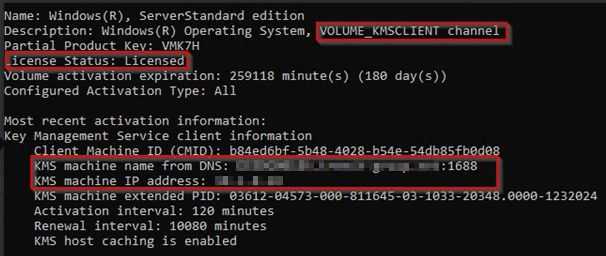
Convert a MAC key activated server to KMS activation
If a server is already activated with an MAC key looks like this:
cscript.exe c:\windows\system32\slmgr.vbs /dli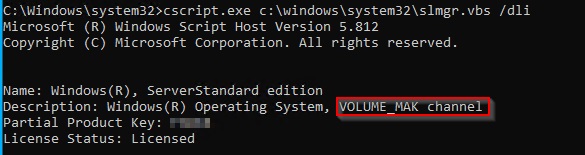
You can simply do the same procedure to install the generic key and activate!
Delete an existing MAC key if necessary
If you have trouble to overwrite the existing MAC key, you can delete the existing windows key with this command:
cscript.exe c:\windows\system32\slmgr.vbs /upk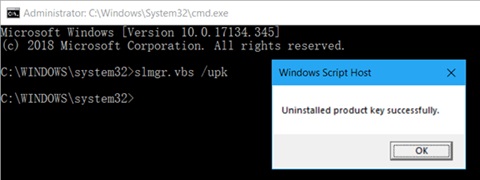
ATTENTION: After this command the windows is not activated!
Now you install and activate the KMS key as descripted above.
Microsoft Source of KMS Keys: Key Management Services-Clientaktivierung (KMS) und Product Keys