
If individual Zabbix pages do not open and instead show an HTTP 500 error, the most likely cause is that PHP has been assigned too little memory. In practice, this often happens when Zabbix tries to render a page that needs more resources than the current PHP memory_limit allows.
Error Analysis in nginx Logs
The fastest way to confirm the problem is to check the nginx error log for memory-related messages. The log file is usually located here:
/var/log/nginx/error.logTo watch the log in real time, use:
tail -f /var/log/nginx/error.logIf the issue is memory-related, you will typically find a message like this:
Allowed memory size of xxxxxx bytes exhaustedA real example may look like this:
text2022/12/08 17:13:35 [error] 12315#12315: *355 FastCGI sent in stderr: "Passing INI directive through FastCGI: unable to set 'always_populate_raw_post_data'
PHP message: PHP Fatal error: Allowed memory size of 268435456 bytes exhausted (tried to allocate 20480 bytes) in /usr/share/zabbix/include/classes/api/CRelationMap.php on line 77
PHP message: PHP Fatal error: Allowed memory size of 268435456 bytes exhausted (tried to allocate 20480 bytes) in /usr/share/zabbix/include/func.inc.php on line 1071" while reading response header from upstream, client: 172.18.7.147, server: csizabbix.sk-ad.de, request: "GET /zabbix.php?action=host.view HTTP/1.1", upstream: "fastcgi://unix:/run/php/php7.2-fpm.sock:", host: "csizabbix.sk-ad.de", referrer: "https://csizabbix.sk-ad.de/overview.php"
The important part is the Allowed memory size ... exhausted message. That clearly shows that PHP ran out of memory while processing the request.
Fixing the PHP Memory Limit
To solve the issue, increase the PHP memory limit in the nginx site configuration file. In your case, the relevant file is:
/etc/nginx/sites-enabled/http.csizabbix.sk-ad.de.confBefore changing anything, it is a good idea to create a backup of the file. Then open it with a text editor such as Nano and adjust the memory_limit value.
Example:
sudo nano /etc/nginx/sites-enabled/http.csizabbix.sk-ad.de.confInside the configuration, change the line:
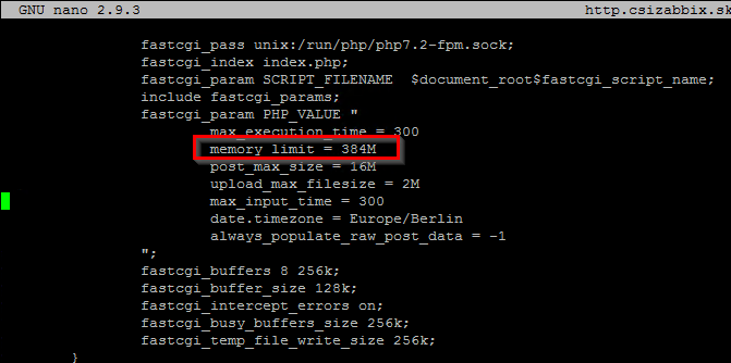
memory_limit = xxxMto a higher value, for example:
memory_limit = 512MRestarting the Services
After updating the configuration, restart both PHP-FPM and nginx so the new setting takes effect.
sudo systemctl restart php7.2-fpm.service
sudo systemctl restart nginx.serviceOnce both services are restarted, the Zabbix pages should open again if the HTTP 500 error was caused by the memory limit.
Short Conclusion
An HTTP 500 error in Zabbix does not always mean a broken application. In many cases, the real issue is simply that PHP does not have enough memory to render the requested page. Checking the nginx error log is the best first step, and increasing the PHP memory_limit usually resolves the problem.