
During a spam wave, it may be necessary to delete certain emails directly from users‘ mailboxes. This requires coordination with the Data Protection Officer (DPO) because it involves direct intervention in the mailboxes. This commands must be used with extreme caution, as incorrect parameters can empty entire mailboxes!
The cmdlet Search-Mailbox is used here, which has been officially deprecated by Microsoft. It has been officially replaced by the cmdlet New-ComplianceSearch, but is still supported on-premises and in the cloud.
Why am I still using the old cmdlet?
Because New-ComplianceSearch no longer allows DELETE operations, but can only search (in a GDPR-compliant manner).
Are there any limitations to the cmdlet?
Search-Mailbox has a limit of 10,000 events per mailbox and may need to be executed multiple times.
Microsofts Docs: Search-Mailbox (ExchangePowerShell) | Microsoft Docs
In order for the cmdlet to be executed at all, the following two Exchange administrator roles are required for the AD user executing the command:
- Discovery Management
- Exchange Mailbox Import Export
The cmdlet has three operating modes:
LogOnly = Only a report is generated, but no emails are deleted or moved.
No parameters = A report is generated and the found emails are copied to the TargetMailbox, but remain in the original mailbox.
DeleteContent = A report is generated and the found emails are moved to the TargetMailbox – the email is no longer present in the original mailbox.
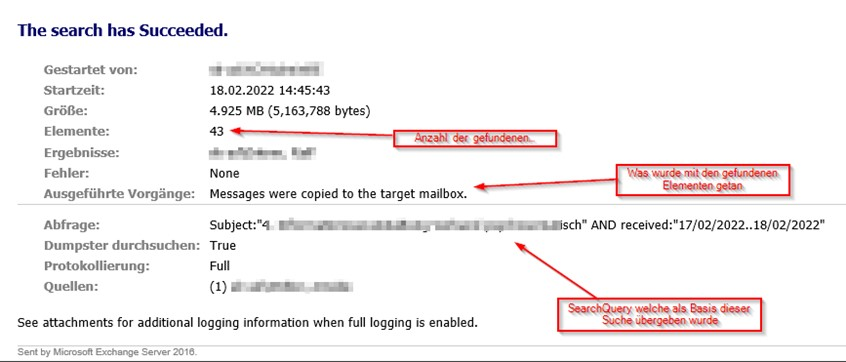
The report then looks like this:
Examples
Example 1 – Scan mailbox and generate report only
This searches MMustermann’s mailbox for emails with the subject „Virus“ received on February 7th/8th, 2022. Only a report is generated; no emails are deleted or copied. The report is sent to mailadmin@xyz.de in the SPAM folder.
Search-Mailbox -Identity MMustermann -TargetMailbox mailadmin@xyz.de -TargetFolder "SPAM" -SearchQuery {Subject:"Virus" AND received:"07/02/2022..08/02/2022"} -LogLevel Full -LogOnly| Parameter | Function |
|---|---|
| Identity | Mailbox to be searched containing malicious email |
| TargetMailbox | Mailbox to which the malicious email is moved |
| TargetFolder | Mailboxfolder to which the malicious email is moved |
| SearchQuery | Search parameter to find the malicious mail |
| LogLevel | Log level of the Report |
| LogOnly | On Log will be created – no action |
Example 2 – Search mailbox, generate report, copy emails, do not delete original emails in user mailbox
Here, MMustermann’s mailbox is searched for emails with the subject „Virus“ and received on February 7th/8th, 2022. A report is generated, and the emails are copied to the SPAM folder in the mailbox mailadmin@xyz.de. The report is sent to mailadmin@xyz.de in the SPAM folder. The original emails remain with the user.
Search-Mailbox -Identity MMustermann -TargetMailbox mailadmin@xyz.de -TargetFolder "SPAM" -SearchQuery {Subject:"Virus" AND received:"07/02/2022..08/02/2022"} -LogLevel Full| Parameter | Function |
|---|---|
| Identity | Mailbox to be searched containing malicious email |
| TargetMailbox | Mailbox to which the malicious email is moved |
| TargetFolder | Mailboxfolder to which the malicious email is moved |
| SearchQuery | Search parameter to find the malicious mail |
| LogLevel | Log level of the Report |
Example 3 – Search mailbox, generate report, copy emails, delete original emails in user mailbox
Here, MMustermann’s mailbox is searched for emails with the subject „Virus“ and received on February 7th/8th, 2022. A report is generated, and the emails are moved to the SPAM folder in the mailbox mailadmin@xyz.de. The report is also sent to mailadmin@xyz.de in the SPAM folder. The moved emails are stored in subfolders for each mailbox, including the folder structure in which they were found.
Search-Mailbox -Identity MMustermann -TargetMailbox mailadmin@xyz.de -TargetFolder "SPAM" -SearchQuery {Subject:"Virus" AND received:07/02/2022..08/02/2022} -LogLevel Full -DeleteContent -Force| Parameter | Function |
|---|---|
| Identity | Mailbox to be searched containing malicious email |
| TargetMailbox | Mailbox to which the malicious email is moved |
| TargetFolder | Mailboxfolder to which the malicious email is moved |
| SearchQuery | Search parameter to find the malicious mail |
| LogLevel | Log level of the Report |
| DeleteContent | Creates a log of the user and moves the malicious mail to the Target Mailbox |
| Force | Forces moving without individual confirmation per email |
Example 4 – Search mailbox database, generate report, copy emails, delete original emails in user mailbox
Here, all mailboxes in the mailbox database MBXDB1 are searched for emails with the subject „Virus“ and received on February 7th/8th, 2022. A report is generated for each mailbox, and the emails are moved to the SPAM folder of the mailbox mailadmin@xyz.de. The report is also sent to mailadmin@xyz.de in the SPAM folder. The moved emails are stored in subfolders for each mailbox, including the folder structure in which they were found.
Get-Mailbox -Database "MBXDB1" -resultsize unlimited | Search-Mailbox -TargetMailbox mailadmin@xyz.de -TargetFolder "SPAM" -SearchQuery {Subject:"Virus" AND received:07/02/2022..08/02/2022} -LogLevel Full -DeleteContent -Force| Parameter | Function |
|---|---|
| Identity | Mailbox to be searched containing malicious email |
| TargetMailbox | Mailbox to which the malicious email is moved |
| TargetFolder | Mailboxfolder to which the malicious email is moved |
| SearchQuery | Search parameter to find the malicious mail |
| LogLevel | Log level of the Report |
| DeleteContent | DELETE emails in user mailbox and moves the malicious mail to the Target Mailbox |
| Force | Forces moving without individual confirmation per email |