
Split DNS is a simple way to make the same fully qualified domain name resolve to different IP addresses depending on where the request comes from. A common use case is Outlook Web Access, where users should reach the service with the same URL both inside and outside the network.
With a split DNS setup, internal clients resolve the name to an internal IP address, while external users continue to reach the public IP address through the normal public DNS zone.
Typical use case
A good example is an OWA server published to the internet. Externally, the name might point to the public firewall or reverse proxy address. Internally, however, the same name should resolve directly to the internal server or load balancer address.
This avoids different URLs for internal and external users and reduces certificate and client configuration issues. It also keeps the user experience consistent, because the same FQDN works in both environments.
Configuration on Microsoft DNS
On a Microsoft DNS server, the setup is straightforward:
- Create a new primary DNS zone.
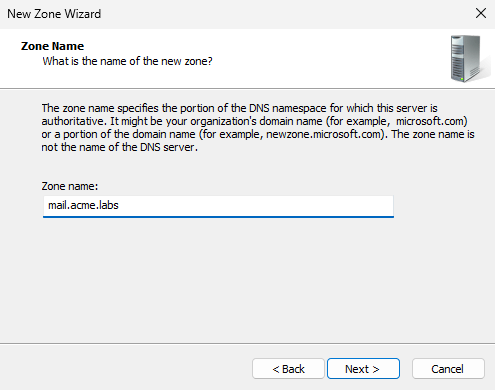
- Make the zone Active Directory integrated.
- Name the zone exactly like the external namespace, for example
mail.acme.labs. - Disable dynamic updates.
- Replicate the zone to all DNS servers in the domain.
- Create an A record for the host name.
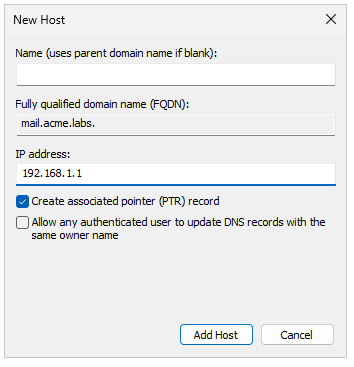
- Leave the record name empty if the zone itself should resolve directly.
- Enter the internal IP address only.
That is enough to make internal DNS clients resolve the FQDN to the internal address while external DNS continues to provide the public target.
Important details
The zone name must match the external name exactly, otherwise clients will not resolve the same FQDN consistently. Also, if the record is created without a host name, the zone apex itself will point to the internal IP address.
This is especially useful when the public DNS zone is managed separately, because the internal Microsoft DNS zone can override the external result only inside the domain.
Why this is useful
Split DNS is a clean solution when a service should be reachable under one name from both internal and external networks. It avoids split URLs, simplifies certificate usage, and makes client configuration easier.
For Exchange, OWA, VPN portals, and similar services, this is often the preferred method.
Conclusion
A Microsoft DNS split zone allows you to map a public FQDN to an internal IP address for domain clients while keeping the external name unchanged for internet users. The configuration is simple, effective, and highly practical for services such as OWA.